
Customer Success Story
Print ready: how Eshuis gave its enterprise customers a faster way to order
A 130-year-old Dutch label converter serving Coca-Cola and Heineken finds a simpler path for enterprise customers, by giving them a choice the platform never offered before.
Eshuis has been printing labels since 1891. A company that coordinated the European rollout of Coca-Cola’s Share-A-Coke campaign, that prints personalised Heineken bottles sold in the Rijksmuseum, that was the first printer in the Netherlands to bring a digital press in-house back in 2003. They understand what complex brand customers need better than most.
Which is exactly why the platform, as it stood, wasn’t the right fit for their enterprise customers.
When enterprise customers need a different path

Eshuis has been an Infigo customer since 2018, using MegaEdit (Infigo’s browser-based design editor) embedded within their Magento e-commerce environment as the online design tool for label orders. The setup worked for what it was built to do: guide customers through the editor before adding to cart.
The issue was who those customers actually are at Eshuis.
Most of them are large brands: brand teams and agencies who arrive with finished, print-ready artwork, pre-approved by their own design departments and signed off long before an order is placed. For them, opening a design editor was a step that added no value and considerable friction. Working on the project alongside project lead, Jorik Kloppenburg, Thomas de Munnink said:
"They have finished artwork, perfect PDFs that were print ready, pre-approved many times before by our own in-house pre-press department, and then they always had to re-upload them in the editor." - Thomas de Munnink, E-commerce Manager, Eshuis
No alternative to the editor
Previously, 100% of orders went through the editor. The only exception was customers ordering on mobile, who could email artwork separately as a workaround. For everyone else, there was no alternative.
Thomas had timed it. Each design took around 12 seconds to load in the old editor. For a customer with multiple label variants, that added up fast. And beyond the loading time, the editor itself presented another problem: it was built for designing from scratch, but the majority of Eshuis customers were not designing from scratch. They were uploading finished files and watching them get processed through a tool that wasn’t built for them.
“A lot of the canvas utilities within the editor were not used at all,” Thomas explains. “The big portion of our customers already had a perfect PDF file and they just wanted to upload that.”
The impact was visible in the data. There was a significant drop-off between add to cart and checkout, with the editor sitting in the middle of that gap.
“We saw a huge drop-off from add to cart to checkout and there’s a giant black box between there,” Thomas says. “The editor was one of it. That hurt conversions for sure.”
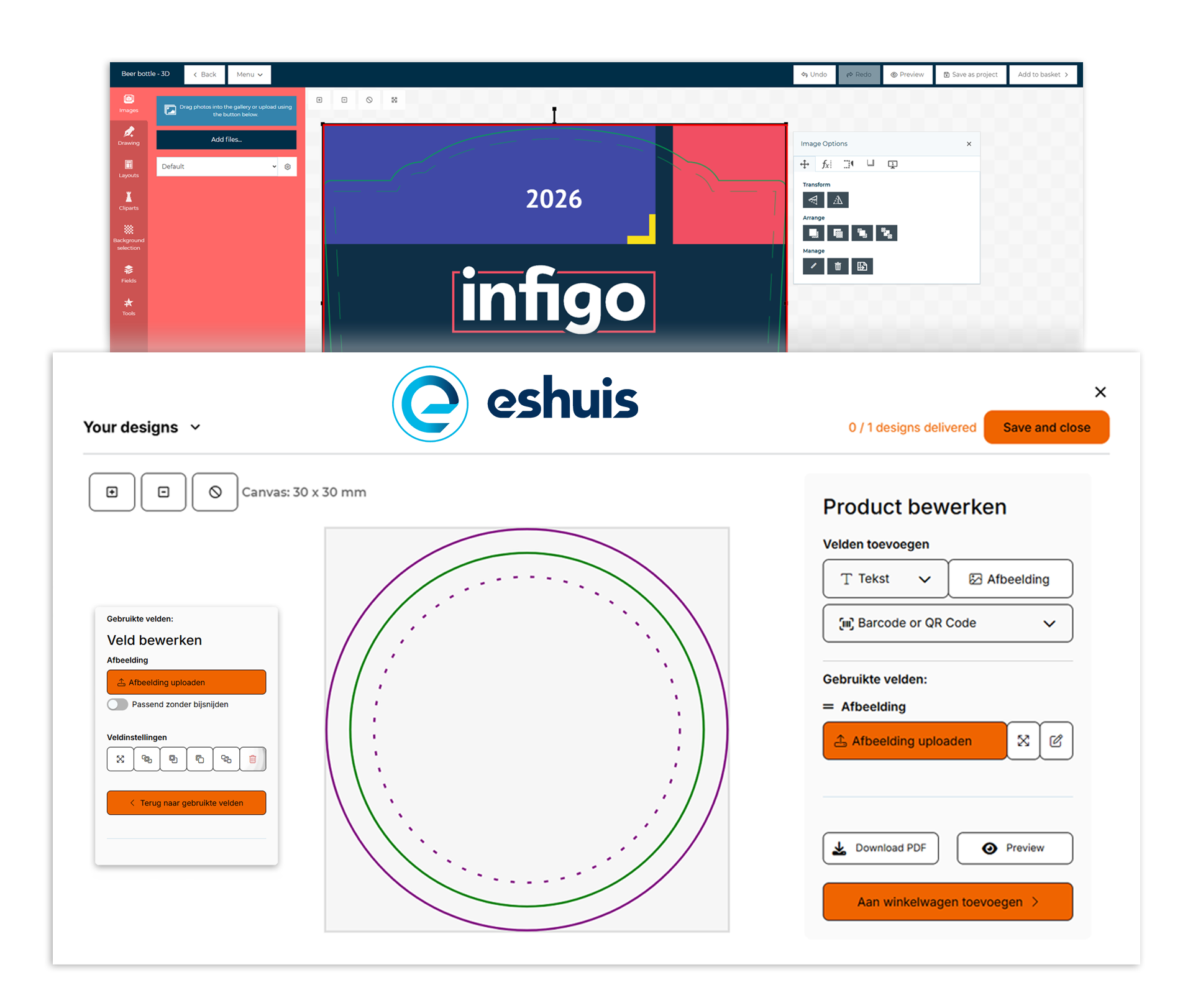
What the relaunch actually changed

The decision to change came from listening. Eshuis interviewed their customers as part of a wider website relaunch and built a list of pain points: things customers flagged directly and things the team had observed themselves. The upload process kept coming up.
Eshuis worked with their agency and Infigo to redesign the experience from the ground up, extending the Magento integration to support a non-standard order flow
The result was two separate paths. Customers who want to design online still can, through an improved MegaEdit experience with Infigo’s form builder tools delivering a cleaner, more polished interface. But customers who arrive with finished artwork now have a dedicated upload path that takes them straight from file to order confirmation.
The agency also built something technically distinctive: a split-screen experience that merges Infigo’s editor with Magento content in a single view, so it looks and feels like one native system to the customer, even though it is drawing from both platforms simultaneously.
"For the customer it looks like a native connection, but actually it's a bit of Magento and a bit of Infigo, and that makes the whole story clear for the customer." - Thomas de Munnink, Ecommerce Manager, Eshuis
Two paths, one upload that opened up more
Since launch, the shift has been dramatic. Orders through the PDF upload path now account for 90% of volume. The editor handles the remaining 10%, mostly customers making small last-minute changes.
The upload path also unlocked something that wasn’t possible before: versioning. For any customer managing a product range where the format stays the same but the artwork changes, think a wine producer with multiple grape varieties, a food brand running seasonal editions, a packaging customer managing regional variants of the same product, the ability to upload each version as part of a single order is a meaningful shift. Previously that meant placing multiple separate jobs.
Now it happens in one session, with each version uploaded, saved and queued in sequence. For businesses managing large and frequently updated product portfolios, that is time saved at every ordering cycle.
The effect on file quality was an added benefit Thomas hadn’t fully anticipated. Because the upload path takes the PDF directly, without processing it through the editor, the files arriving in production are cleaner.
Thomas de Munnink, E-commerce Manager, Eshuis
Faster for customers, cleaner for production
The speed improvement is significant enough that Thomas measured it. A customer with three label variants who previously spent close to three minutes working through the editor can now complete the same task in 30 to 40 seconds.
"A user can just upload a PDF they already have on their computer, press the button, save and next, and go to the next design. When they have three designs, they are finished in maybe 30, 40 seconds. It used to be like three minutes." - Thomas de Munnink, E-commerce Manager, Eshuis
The commercial results have followed. The e-commerce channel, which already grows at 20 to 30% annually, is running 6% ahead of its targets for the year. Conversion rates are improving, with more customers completing the order funnel and more new customers purchasing for the first time. Thomas is still working on getting a clean read across all order types, including the reorder module, but the direction is clear.
"We see that more people are completing our configurator and more people are purchasing from us who are new to our business. The e-commerce funnel as a whole is doing better than it was before, and Infigo is a big part of that." - Thomas de Munnink, E-commerce Manager, Eshuis
A partnership with room to grow
Eshuis came into the relaunch project questioning whether the partnership still worked for them. The editor was a pain point, and there had been conversations internally about whether to look elsewhere.
What changed was sitting down with Infigo and going through the challenges properly.
“When we sat down with Infigo to go over all the points we wanted to improve, there were a lot of possibilities we didn’t know about before,” Thomas says. “That’s why I say there was some new life brought into our partnership.”
The relaunch required all three parties (Eshuis, their agency, and Infigo) to work closely together, and getting everyone communicating directly made the difference. Once the lines were short, progress accelerated.
“In the end it was all good teamwork,” Thomas reflects. “This partnership improved the way our users deliver their artwork. It’s a way to optimise the customer journey.”
What's next
With the upload path embedded and performing, the next area of focus for Eshuis and Infigo is preflighting: automating the technical checking of incoming files before they reach production. For a business processing the volume of artwork that Eshuis handles, the ability to catch file issues at the point of upload rather than further down the production chain is the logical next step in tightening the workflow.
Key takeaways for B2B print leaders

3 minutes, down to 30-40 seconds
A customer with three label variants now completes an order in under a minute, against nearly three minutes through the old editor.

90% of orders, one upload path
Since launch, nine in ten Eshuis orders go straight through the new PDF upload path rather than the editor.

One session, every version
Customers managing multiple artwork variants, like seasonal editions or regional packaging, now upload and queue each one in a single order instead of placing separate jobs.

Cleaner files, fewer production issues
Taking the PDF directly, without routing it through the editor, means the files reaching Eshuis’s production team arrive cleaner.
FAQ'S
Book a demo
Frequently Asked Questions
Didn't find the answer?
No worries! If you have any other questions or need more information, feel free to reach out directly. We’re always happy to help and make sure you feel confident. Let’s chat!
-
Most of Eshuis’s customers are large brands that arrive with finished, pre-approved artwork rather than designing from scratch. Uploading that artwork into MegaEdit added a step that created friction without adding value, and each design took around 12 seconds to load.
-
A customer with three label variants now completes their order in 30 to 40 seconds, down from close to three minutes through the old editor-only process.
-
90% of orders now go through the PDF upload path. The remaining 10% still use the editor, mostly for small last-minute changes.
-
Versioning lets a customer upload multiple artwork variants, for example different grape varieties or seasonal editions, as part of a single order session, with each version uploaded, saved and queued in sequence. Previously this meant placing separate jobs for every variant.
-
Preflighting: automating the technical checking of incoming files at the point of upload, rather than catching issues further down the production chain.
See what Infigo can do for your business
Ready to cut ordering time from minutes to seconds?
Eshuis replaced its editor-only order flow with a dedicated PDF upload path, cutting a three-label order to 30 to 40 seconds and moving 90% of volume off the design tool entirely. Find out what that looks like for your business in a tailored 1-to-1 demo.

Latest Posts

20/10/2026
Your Next Customer Won’t Call Your Sales Rep
What AI and online buying mean for the people running multi-site label converters, and what to do about it on Monday. A few years ago, I sat with the owner of a print business who told me something that has stayed with me. He said his best salesperson was not the one who knew the […]
Read More
24/09/2026
Infigo and Ultimate Tech automate imposition for web-to-print orders with Ultimate Impostrip®
Orders placed on an Infigo storefront now move straight into Ultimate Impostrip® automated imposition, with production-ready files delivered to your existing hotfolder or MIS. Infigo and Ultimate Tech have launched a new Impostrip web-to-print integration, built on the two companies’ existing partnership. It connects the Infigo web-to-print platform to Ultimate Impostrip®, Ultimate Tech’s imposition and […]
Read More
10/09/2026
Infigo partners with BCC Software to bring address cleansing and real-time postage pricing to web-to-print
Integration embeds BCC Software Architect REACH™ service directly into Infigo’s web to print platform, delivering up to 42% postage savings in early results. We’ve partnered with BCC Software to bring automated address cleansing, USPS mail preparation, and real-time postage pricing directly into the Infigo online ordering workflow. The integration connects our web-to-print platform to BCC […]
Read More